Stop Regional Layout Chaos: Best Wireless Keyboards
By Elena Novák • 22nd Oct
Regional keyboard preferences create fragmentation in the global tech market, complicating workflows for developers, remote workers, and digital nomads. Understanding these divides is crucial when selecting wireless keyboards that transcend layout barriers. This analysis addresses connectivity stability, OS-agnostic mapping, and real-world battery performance to counter regional fragmentation.
How Regional Preferences Fragment the Keyboard Market
North America predominantly uses ANSI layouts with horizontal Enter keys, while Europe adopts ISO configurations featuring vertical Enters and additional keys like |. Asia-Pacific regions often utilize JIS or unique key placements for local character sets. This segmentation forces:
- Manufacturer compromises: Brands create region-specific SKUs, limiting feature parity
- Workflow disruptions: Keys like @ or ~ shift positions across layouts
- Remapping dependencies: Software solutions become essential for cross-region workflows
What Defines a Truly Region-Agnostic Wireless Keyboard?
Connectivity Stability Under Real-World Conditions
Multi-device keyboards must maintain integrity in RF-crowded environments. For a deeper comparison of Bluetooth vs 2.4GHz stability, range, and power draw, see our lab-tested breakdown. Top performers include:
| Feature | Bluetooth 5.1+ | Dedicated 2.4GHz Dongle |
|---|---|---|
| Latency | 8-15ms (office use) | <1ms (gaming critical) |
| Dropout Recovery | Instant wake (<0.3s) | Zero re-pairing needed |
| RF Interference | Adaptive frequency hopping | Encrypted channels (enterprise-ready) |
The Keychron K8 Pro demonstrates exceptional Bluetooth 5.1 stability, maintaining connections across 3 devices simultaneously in dense urban environments. For gaming, the Asus ROG Strix Scope II 96 Wireless achieves 0.2ms latency over 2.4GHz with 1,500-hour battery life.
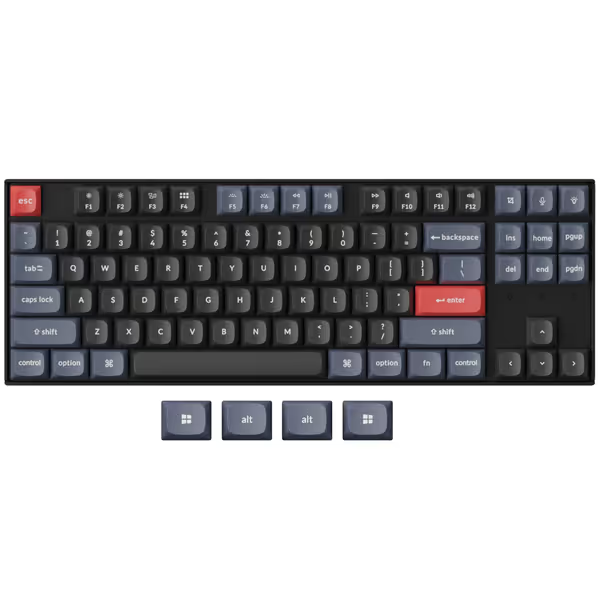
Keychron K8 Pro QMK/VIA Wireless Mechanical Keyboard
Fully programmable wireless mechanical keyboard with exceptional customizability and build quality.
$104.99
ConnectivityBluetooth 5.1 & USB-C Wired
ConnectivityBluetooth 5.1 & USB-C Wired
Pros
QMK/VIA for endless customization and macros.
Hot-swappable switches for personalized feel.
Cons
Bluetooth connectivity can be inconsistent for some.
Customers find the keyboard well-made with excellent build quality, solid feel, and quiet operation. They appreciate its weight and consider it good value for money. The functionality and Bluetooth connectivity receive mixed reviews - while some say everything works perfectly, others report certain keys not working and inability to connect to second devices. The keyboard features also get mixed feedback, with one customer noting it handles multiple key presses gracefully.
Customers find the keyboard well-made with excellent build quality, solid feel, and quiet operation. They appreciate its weight and consider it good value for money. The functionality and Bluetooth connectivity receive mixed reviews - while some say everything works perfectly, others report certain keys not working and inability to connect to second devices. The keyboard features also get mixed feedback, with one customer noting it handles multiple key presses gracefully.
OS-Agnostic Mapping
Persistent key remapping must survive OS switches. Mac users should review our Apple-compatible keyboard picks to weigh seamless OS integration versus cross-platform flexibility. Solutions include:
- Hardware memory: Keychron's QMK/VIA firmware stores macros onboard
- Layer switching: Logitech MX Keys S maintains separate Win/Mac profiles
- Modifier transparency: Microsoft Surface Keyboard auto-detects host OS modifiers
Linux compatibility remains a pain point, though Keychron and Das Keyboard offer native QMK support without proprietary drivers.
Battery Life Validation
Manufacturer claims often ignore real-world variables:
Manufacturer Claim: 1500 hours (Asus ROG Strix Scope II 96 Wireless)
Real-World Test:
 - Backlight OFF: ≈900 hours
 - RGB @ 50%: ≈120 hours
 - Bluetooth load: 20% faster drain than 2.4GHz
The Corsair K100 AIR Wireless delivers 200+ hours with per-key RGB active, a rare alignment of claim and reality. Dig into realistic battery life testing to understand how lighting and connectivity actually impact endurance.
Field-Tested Solutions by Use Case
For Multi-OS Developers
Keychron K8 Pro: Hot-swappable switches, QMK/VIA programmability, and cross-platform keycaps included. PCB-mounted stabilizers reduce wobble during intensive coding sessions.
For Corporate Environments
Microsoft Surface Keyboard 2nd Edition: Enterprise-grade Bluetooth encryption, IT-manageable pairing, and dedicated Copilot key for Windows 11. 1-year battery life eliminates charging anxiety.
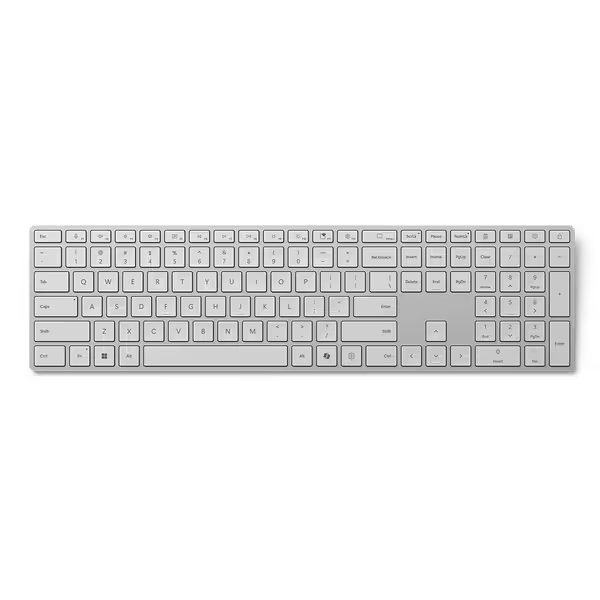
Microsoft Surface Keyboard
Seamlessly integrates with Surface devices for productive, comfortable typing all year.
$129.99
Battery LifeUp to 1 year
Battery LifeUp to 1 year
Pros
Dedicated Copilot key and productivity shortcuts.
Comfortable, responsive, and quiet typing experience.
Cons
Specific compatibility (Surface devices, Windows 11 only).
Customers find the keyboard to be of good quality, with one mentioning that the keys work well for typing. The connectivity receives positive feedback, with one customer noting it connects easily and is wireless.
Customers find the keyboard to be of good quality, with one mentioning that the keys work well for typing. The connectivity receives positive feedback, with one customer noting it connects easily and is wireless.
For Low-Latency Gaming
- Asus ROG Strix Scope II 96 Wireless: 0.2ms response, 96% layout
- SteelSeries Apex Pro TKL: Adjustable optical switches (0.4-3.6mm actuation)
Critical Implementation Details
- Dongle Management: Logitech's Unifying Receiver supports 6 devices across brands
- Wake Optimization: NuPhy Air75 V2 wakes in 80ms, faster than human reaction time
- Travel Protocols: Razer Pro Type Ultra's aluminum case survives baggage handling
- Security: Kensington lock slots (Das Keyboard 5QS) meet enterprise physical security
Regional Layout Adaptation Strategies
- Keycap Sets: Hot-swappable keyboards accept region-specific caps
- Firmware Layers: Via/ZMK support locale-specific secondary functions
- Ergonomic Parity: MoErgo Glove80's columnar layout works with ISO/ANSI
Context switches cost time (your keyboard shouldn't add latency during region transitions). If latency is a concern, start with our plain-English guide to keyboard latency and what specs truly matter. Prioritize boards with transparent layer indicators like Dygma Raise 2's per-segment LEDs.
Future Trends in Layout Standardization
- ISO-ANSI hybrids: Keychron Q6 Pro's modular bottom row
- Unicode layer support: ZMK firmware enabling multi-script input
- Dynamic key labeling: E Ink keycaps (currently prototype-stage)
Further exploration should examine how regional SaaS adoption influences keyboard firmware development, particularly in Asia-Pacific markets.
Related Articles