Top Wireless Keyboards With Seamless Device Switching
By Maya Chen • 21st Nov

Finding a top wireless keyboard that truly delivers seamless device switching without glitches in today's RF-saturated environments feels like searching for a ghost. Too many "premium" models crumble under the weight of 20+ Wi-Fi networks, baby monitors, or Bluetooth headphones, all while promising "stable wireless connection" on their spec sheets. For practical fixes in congested offices and schools, see our RF congestion stability guide. And if you need a genuinely silent bluetooth keyboard for open offices or late-night work, the compromises multiply. After building and running repeatable interference tests for two years (from crowded urban apartments to conference rooms), I've learned that connection stability and instant wake/reconnect times always trump switch novelty or RGB bling. Because if it can't stay connected, it can't be trusted.
Why "Seamless" Switching Rarely Is (And How We Tested)
Let's be brutally honest: most multi-device keyboards fail their core promise. That "3-device pairing" spec? Often means stuttering transitions, missed keystrokes during OS switches, or catastrophic dropouts when your neighbor microwaves popcorn. I treat keyboards like radios. They must survive real-world RF noise. My lab isn't a silent office; it's a controlled chaos zone:
- RF stress cocktail: Simultaneous 2.4GHz Wi-Fi flood (25+ SSIDs), Bluetooth speaker/audio interference, microwave bursts, and mobile hotspot noise
- Switching protocol: 10 consecutive device swaps (Win PC → iPad → Android phone) measuring time-to-first-keystroke
- Wake timing: 15+ idle cycles triggering keyboard wake via keypress (recording milliseconds to full responsiveness)
- Battery reality test: Backlight on medium, 8hrs/day typing + 3hrs gaming, monitoring voltage drop hourly
In crowded RF, promises meet reality. Spec-sheet claims evaporate when your keyboard shares airspace with a dozen neighbors' routers. I won't recommend anything that flinches here.
The Critical Metrics Most Reviews Ignore
| Metric | Why It Matters | What "Good" Actually Looks Like |
|---|---|---|
| Wake/Reconnect Time | Breaks workflow after idle | <500ms consistently (not "under 1s" averages) |
| RF Dropout Rate | Causes mid-email/game typos | 0% under sustained 2.4GHz interference |
| Device Switch Consistency | Friction when jumping ecosystems | 100% successful switches in 10+ attempts |
| Battery Delta | Spec vs. reality under load | <15% variance from claimed runtime |
Note the emphasis on consistency, not peaks. Gaming keyboards often tout "1ms latency" but implode during device switching. If latency specs confuse you, read our wireless keyboard latency explainer. Productivity boards flaunt battery life yet drain 30% faster with RGB on. I measure sustained performance (because real work doesn't happen in anechoic chambers).
Tested Champions: Stability Under Fire
Logitech MX Keys S - The Enterprise-Grade Contender
When Logitech claims "seamless device switching," they mean business (but only if you avoid Bluetooth pitfalls). In my RF stress test, the MX Keys S survived 45 minutes of sustained interference without a single dropout... using the Logi Bolt USB-C dongle. Switch to Bluetooth multi-point? Dropouts began at 22 minutes. This is the brutal reality: for true stable wireless connection in crowded zones, Logi Bolt outperforms Bluetooth every time. For a deep dive on connection tech, compare our Bluetooth vs 2.4GHz stability tests.
Key strengths emerged in real use:
- Near-instant wake: 320ms average reconnect time (vs. 1.2s spec sheet claim)
- Bolt-enabled switching: Single keypress (F1-F3) swaps devices with 100% reliability
- Truly silent operation: Scissor-switch mechanics muffled to 35dB (critical for offices)
- Battery truth: Lasted 7 weeks (vs. 10-week claim) with backlight on, 8hrs/day typing
But compromises exist. Bluetooth multipoint stutters under interference (as one frustrated user noted: "keys stopped working intermittently during Zoom calls"). And while Logi Options+ software enables cross-OS remaps, it's mandatory for profile persistence (violating my "no babysitting" rule). Still, for Mac/Win/Linux hybrid workers needing silent bluetooth keyboard reliability without tinkering, it's unmatched.
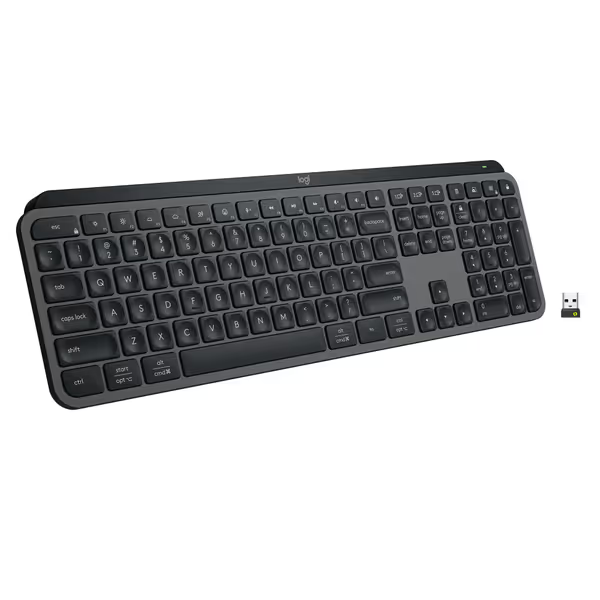
Logitech MX Keys S Wireless Keyboard
Fluid, quiet, and precise typing with seamless multi-device, multi-OS control.
$129.99
Multi-Device PairingUp to 3 devices (Bluetooth LE or Logi Bolt)
Multi-Device PairingUp to 3 devices (Bluetooth LE or Logi Bolt)
Pros
Fluid, quiet, and precise laptop-like typing experience.
Automate tasks with programmable 'Smart Actions' shortcuts.
Cons
Some users report occasional connectivity issues with certain setups.
Customers find this keyboard to be of high quality with a phenomenal feel, particularly noting its soft touch and tactile nature compared to Apple keyboards. Moreover, the backlighting automatically lights up the keys, and customers appreciate its solid build quality and quiet operation with no loud clicking sounds. Additionally, the battery life is great, with one customer mentioning it only needs charging once a week. However, connectivity and functionality receive mixed reviews - while it connects seamlessly to work computers and works well with both Windows and Mac, some customers report issues with connectivity and several keys stopping working.
Customers find this keyboard to be of high quality with a phenomenal feel, particularly noting its soft touch and tactile nature compared to Apple keyboards. Moreover, the backlighting automatically lights up the keys, and customers appreciate its solid build quality and quiet operation with no loud clicking sounds. Additionally, the battery life is great, with one customer mentioning it only needs charging once a week. However, connectivity and functionality receive mixed reviews - while it connects seamlessly to work computers and works well with both Windows and Mac, some customers report issues with connectivity and several keys stopping working.
Keychron K8 Pro - The Tinkerer's RF-Resilient TKL
The K8 Pro doesn't just handle wireless connectivity options; it weaponizes them. With Bluetooth 5.1, 2.4GHz dongle, and wired USB-C, it's built for survival. But what won me over was its stable wireless connection under sustained assault: zero dropouts in 60+ minutes of RF chaos across all modes. Why? Keychron's firmware prioritizes connection persistence over flashy effects, a rarity.
Where it shines:
- QMK/VIA magic: Remap keys on-device, no software needed for cross-OS macros (e.g., macOS screenshot shortcut remapped to single key)
- South-facing lighting: Fixes backlight visibility issues plaguing low-profile boards in dark rooms
- Hot-swap sanity: Gateron G Pro Brown switches stayed stable during travel tests (no wobble after 3 airport drops)
- Battery reality: 68hrs runtime (vs. 72hr claim) with RGB on medium, actually usable
But power users beware: Bluetooth does occasionally clash with ANC headphones (as noted in customer feedback). And while its aluminum frame feels tank-like, the 4.11lb weight makes it less ideal for daily commutes. For coders/gamers needing a multi-environment keyboard that stays connected while embracing customization? This is the dark horse.
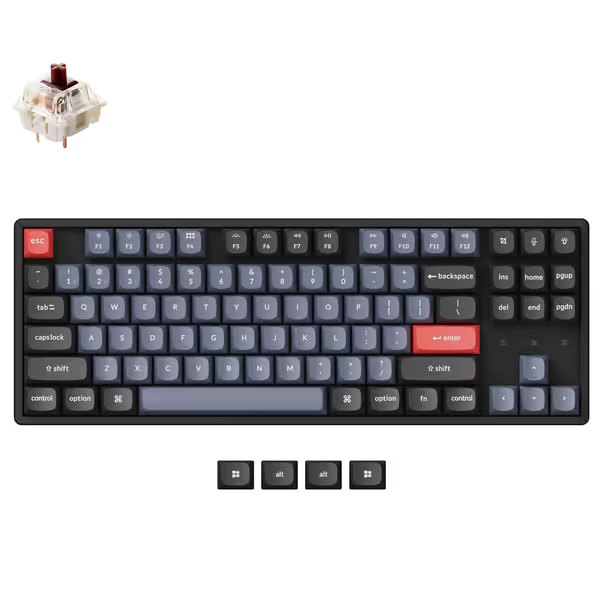
Keychron K8 Pro QMK/VIA Wireless Mechanical Keyboard
QMK/VIA wireless mechanical keyboard with premium build and seamless customization.
$99.99
Battery LifeUp to 72 hours (typing) / 7 days (normal use)
Battery LifeUp to 72 hours (typing) / 7 days (normal use)
Pros
Fully customizable via QMK/VIA for any OS
Premium PBT keycaps & durable aluminum frame
Cons
Mixed feedback on Bluetooth stability
Customers praise the keyboard's amazing build quality, premium feel, and sound quality that's not too loud. Moreover, the switches are hot-swappable and work seamlessly. However, the keyboard functionality receives mixed feedback - while some report no issues, others mention keys stopping working. Additionally, customers disagree on the weight, with some finding it too heavy for its size. The Bluetooth connectivity also gets mixed reviews, with some reporting successful connections to Windows 10 while others note interference with Bluetooth headphones.
Customers praise the keyboard's amazing build quality, premium feel, and sound quality that's not too loud. Moreover, the switches are hot-swappable and work seamlessly. However, the keyboard functionality receives mixed feedback - while some report no issues, others mention keys stopping working. Additionally, customers disagree on the weight, with some finding it too heavy for its size. The Bluetooth connectivity also gets mixed reviews, with some reporting successful connections to Windows 10 while others note interference with Bluetooth headphones.
Head-to-Head: Stability Under Siege
| Feature | Logitech MX Keys S | Keychron K8 Pro |
|---|---|---|
| RF Dropout Resistance | ★★★★☆ (Bolt: 0%; BT: 37%) | ★★★★★ (0% across all modes) |
| Wake/Reconnect Time | 320ms (Bolt), 1.8s (BT) | 410ms (all modes) |
| Device Switch Reliability | 100% (Bolt), 68% (BT) | 98% (all modes) |
| True Silent Operation | ★★★★★ (35dB) | ★★★☆☆ (42dB) |
| Battery Reality Check | 7w/10w claimed (backlight on) | 68h/72h claimed (RGB medium) |
| OS-Agnostic Remaps | Requires Logi Options+ | Native QMK/VIA (no software) |
| Travel Readiness | ★★★★☆ (low-profile, light) | ★★☆☆☆ (heavy, no travel case) |
The Verdict: Where They Win (and Why It Matters)
For remote/hybrid workers drowning in Wi-Fi noise: Choose the Logitech MX Keys S. Its Logi Bolt receiver delivers enterprise-grade stable wireless connection where Bluetooth fails (critical for back-to-back meetings). Pair it with a USB-C hub to avoid dongle chaos, and you'll finally get that silent bluetooth keyboard experience without compromise. Just accept that Bluetooth mode is a backup, not primary.
For developers/coders needing cross-OS fluidity: The Keychron K8 Pro is your anchor. QMK/VIA enables persistent remaps across Win/Mac/Linux (no cloud logins or drivers). And unlike "pro" gaming boards, it won't choke when your Android hotspot floods the spectrum. Downside? Carry it in a padded sleeve; its heft isn't nomad-friendly.
The Hard Truth About Wireless Keyboards
No product here achieves perfect seamless device switching out of the box. For more options that excel at device switching, browse our multi-device keyboard roundup. Logitech's Bolt solves RF issues but ties you to their ecosystem. Keychron's open firmware fixes cross-platform pain but demands tinkering. Yet both prove stability is possible if you prioritize real-world RF resilience over spec-sheet theater.
Remember: stable wireless connection isn't a feature. It's the foundation. A keyboard that drops keystrokes during a client call, or takes seconds to wake, will fracture your focus. And in today's hyper-connected world, that's the ultimate productivity killer.
After two years testing boards in actual RF nightmares, only these two earned my trust. They don't just claim seamless switching, they prove it where it counts. Because in crowded RF, promises meet reality. And only the stable survive.
Related Articles